Each project plan in the system goes through several stages — from draft creation, approval, and finalization. By default, project plans have the following statuses:
- Draft. A new or edited version of the plan that has been saved but hasn’t been approved or published. This status is also assigned to projects restored from the archive. There can be several drafts of a plan at the same time.
- Pending approval. A version of the plan sent for approval and not yet approved.
- Approved. An approved version of the plan that hasn’t been published.
On the plan chart, you can see the name of the approver next to the Pending approval and Approved statuses.
- Current. The published version of the plan. Only one version can be current.
- Archived. The current version is assigned this status when another version is published or when the project is archived.
These are the default statuses. They cannot be deleted, and their codes cannot be changed. However, the administrator can add additional statuses.
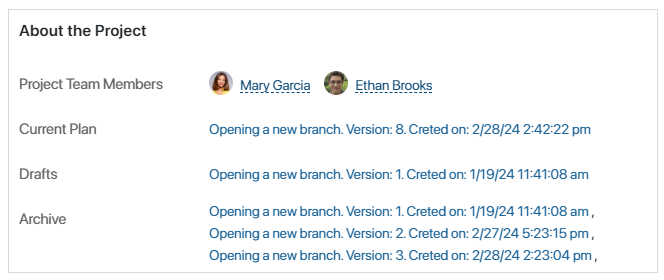
The statuses of all the versions of the plan are displayed on the project page, in the About the Project widget. It shows:
- Current Plan.
- Drafts. All versions assigned the Draft, Pending approval, and Approved statuses.
- Archive. All plan versions that have ever been created for the project.