This article describes the release lifecycle for BRIX On-Premises, including version support timelines and system update recommendations.
Key terms
- Software lifecycle is the period from a version’s initial release to the end of its support.
- Major release is a system version that includes significant changes compared to the previous version. Major releases of BRIX On-Premises are divided into regular releases and Long Term Support (LTS) releases.
- Long Term Support (LTS) release is a version with an extended support period. LTS releases include only critical fixes and security updates.
- Intermediate updates are versions released between major releases and applied only to BRIX SaaS and the BRIX trial environment. They contain beta features and aren't provided for BRIX On-Premises.
- Minor release is a small update within a major release focused bug fixes and stability improvements.
- Beta features introduce new functionality in BRIX SaaS and the trial environment via intermediate updates.Once verified for stability, these features are included in the next major BRIX On-Premises release.
Release lifecycle
Starting from version 2026.4, a new release model is in effect:
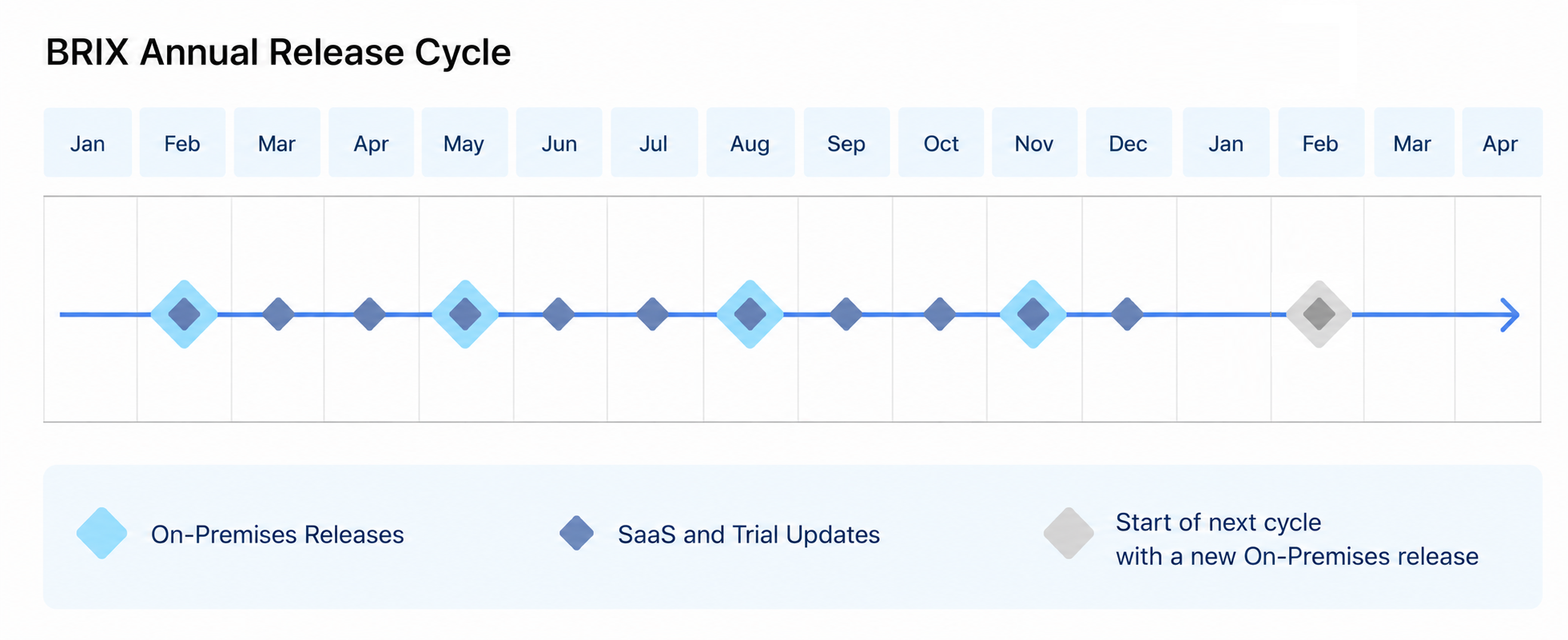
- Four major releases per year are available for BRIX On-Premises.
- Seven intermediate updates per year are released only for BRIX SaaS and the demo environment.
- One LTS release per year. One of the major BRIX On-Premises releases is designated as LTS and receives extended support (two years).
Less frequent releases reduce the effort required for system updates and client-side testing. New features undergo additional stabilization in BRIX SaaS and the demo environment before being included in the next major BRIX On-Premises release.
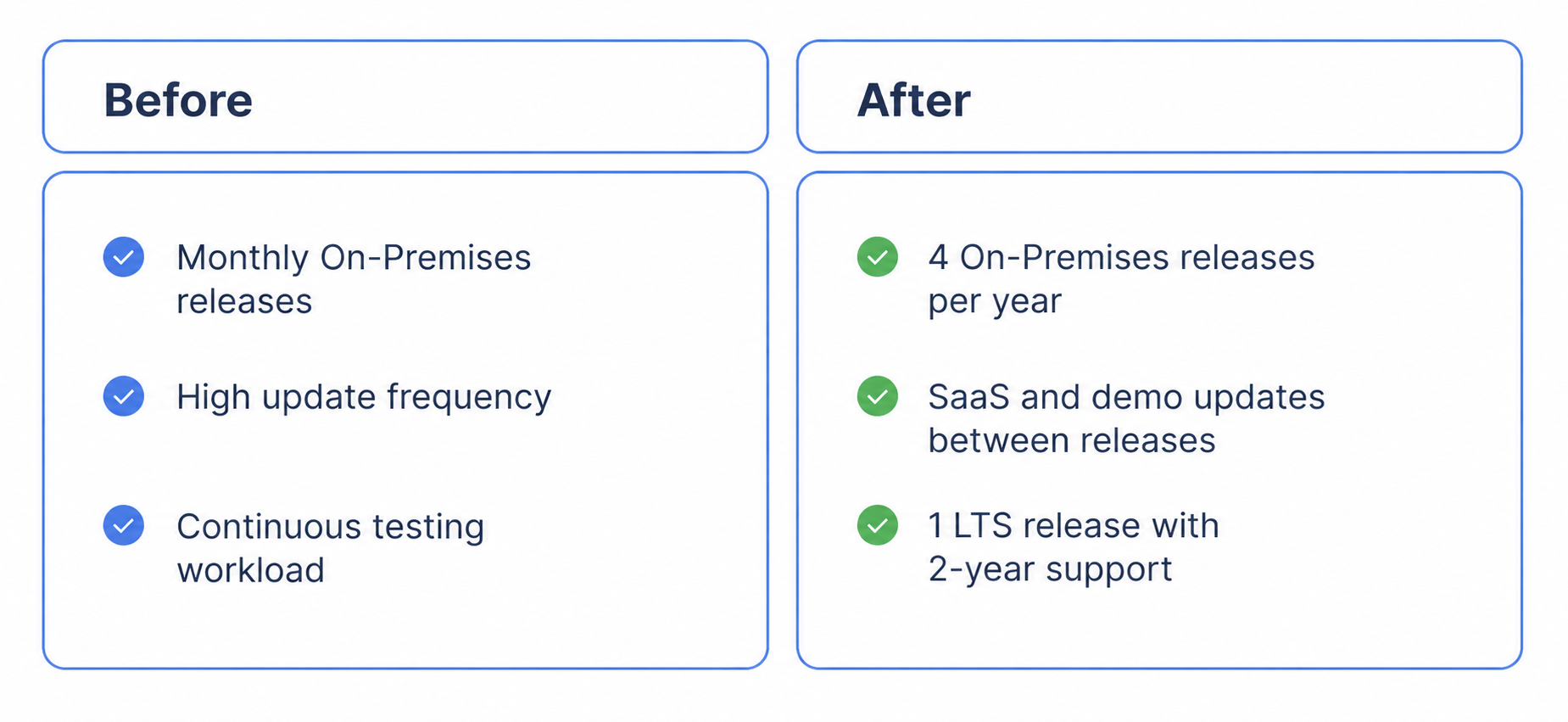
Let’s take a closer look at the schedule of major releases and intermediate updates, the LTS designation timeline, and version support for BRIX On-Premises. Please note that due to the phased transition to the new lifecycle in 2026, some releases have special support periods.
Major BRIX On-Premises releases
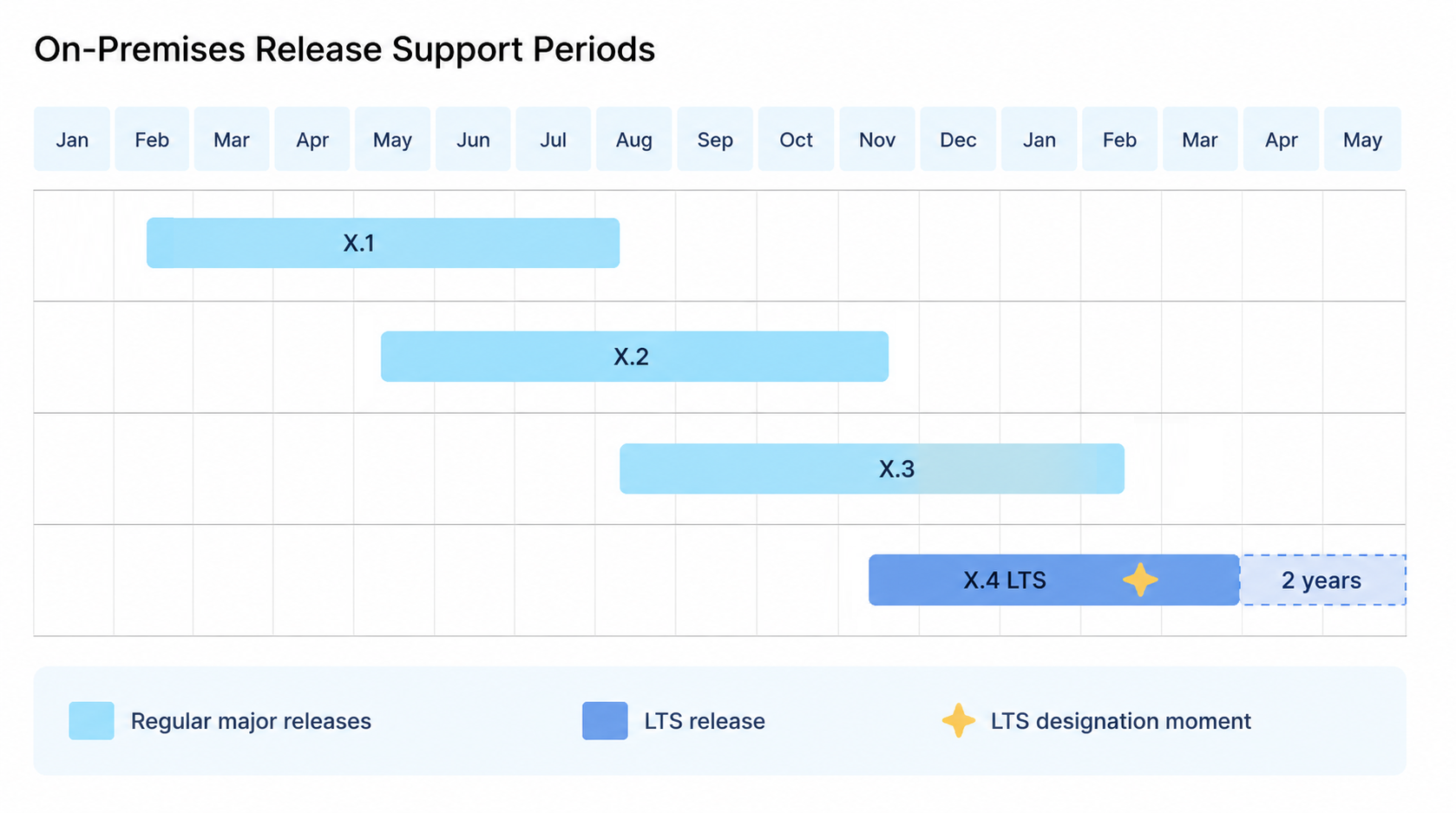
A regular major release is supported for approximately six months from its release date. During this period, minor updates with bug fixes are issued.
At any given time, both the current and the previous releases are supported. For example, support for version 2026.7 continues after the release of 2026.10 and ends with the release of 2027.1.
Intermediate updates
Intermediate updates are released only for BRIX SaaS and the demo environment and are not available for BRIX On-Premises. The features included in these updates are considered beta features. They undergo additional validation and stabilization during intermediate updates and are later included in the next major BRIX On-Premises release.
As a result, BRIX SaaS users gain earlier access to new features, while BRIX On-Premises releases include fully tested and stabilized functionality.
LTS releases
LTS releases are ideal for companies that prioritize stability, extended support windows, and less frequent updates. These releases are supported for approximately two years. A version isn't designated as LTS at the moment of its release, but rather after a stabilization period that lasts until the next major release—roughly three months.
Both the current and the previous LTS release are supported. For example, version 2026.10 receives LTS status upon the release of version 2027.1, and its support continues until version 2028.10 is locked in as LTS.
During its support lifecycle, an LTS release receives minor updates containing only:
- Critical fixes that impact core system functionality.
- Security updates.
начало внимание
Keep track of release announcements and install the latest minor updates for your LTS version promptly to ensure you receive all critical bug fixes.
конец внимание
Version numbering
BRIX On-Premises versions follow the X.Y.Z versioning format, where:
- X is the release year.
- Y is sequential number of the major release within the year.
- Z is the minor version number within the major release.
Example: 2026.4.1 is a minor version of release 2026.4.
Transition period in 2026
The year 2026 is a transition period between the previous monthly release model and the new quarterly model. Special support periods apply to releases during this time:
- LTS 2025.4 is supported until the end of July 2026.
- LTS 2025.10 is supported until the end of February 2027.
- Major release 2026.1 is supported until release 2026.4 (May 2026).
- Major release 2026.2 is supported until release 2026.7 (August 2026).
- Intermediate update 2026.3 is available only for BRIX365 SaaS and the demo environment.
- LTS 2026.4 is assigned LTS status starting August 2026; planned support until LTS 2027.10 is designated (end of October 2027).
All releases starting from version 2026.4 follow the new lifecycle model.
Update procedure
When planning an update, it is recommended to:
- Review the list of changes in the target version.
- Check compatibility of custom extensions and integrations.
- Create a backup of data and configuration.
- Perform the update in a test environment first.
- After validation, update the production environment.
When using LTS releases, you can upgrade directly from one LTS release to the next without installing intermediate major versions.
For more information about the update process, refer to:
What end of support means
When a BRIX On-Premises version reaches end of support:
- Technical support only handles issues critical to system operation.
- Updates and distribution packages for the version are no longer available.
- Documentation for the version is no longer updated.
It is recommended to use the latest major BRIX On-Premises release or an LTS version. The current list of supported versions is available on the technical support website.
Download a specific BRIX On-Premises version
You can install a specific BRIX On-Premises version, such as:
- The latest major version.
- A specific minor version of a release.
- The current LTS version.
- A minor version of a specific LTS release.
To learn more about installing the system, see Install BRIX in Kubernetes.