You can add the following activities to the scenario to send newsletters to subscribers if their data matches the conditions specified in the trigger:
- Email to send an email if you’ve configured an integration module for an email service.
- Messenger to send a message via messenger if you’ve configured an integration module for it.
Multiple campaigns can be executed within a single scenario. For more information, see Use cases for customer journey map scenarios.
Email activity
It sends an email to the subscriber. First, you should configure a custom integration module for an email service. Read more in BRIX TS SDK.
In the block settings, fill in the fields:
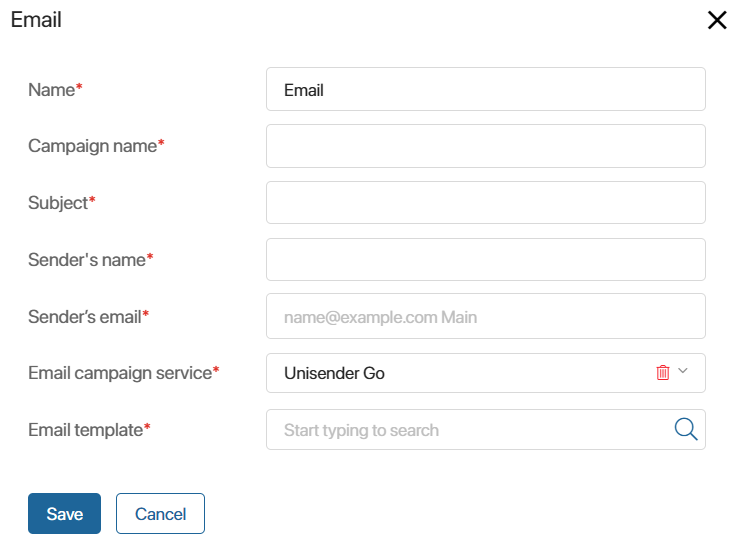
- Name*. Enter the name of the block in the scenario.
- Campaign name*. Enter the name of the email campaign.
- Subject*. Specify the subject of the email.
- Sender’s name*. Specify the sender.
- Sender’s email*. Enter the email address from which emails will be sent.
- Email campaign service*. Select the email service with which the integration is configured.
- Email template*. Select a template for the email.
Click Save.
Messenger activity
It allows you to send a message to a client in a chat with a messenger bot.
For proper operation, the system administrator must first configure integration with the messaging service or directly with the bot via the custom integration module. For more information, see BRIX TS SDK.
In the block settings, fill in the following fields:
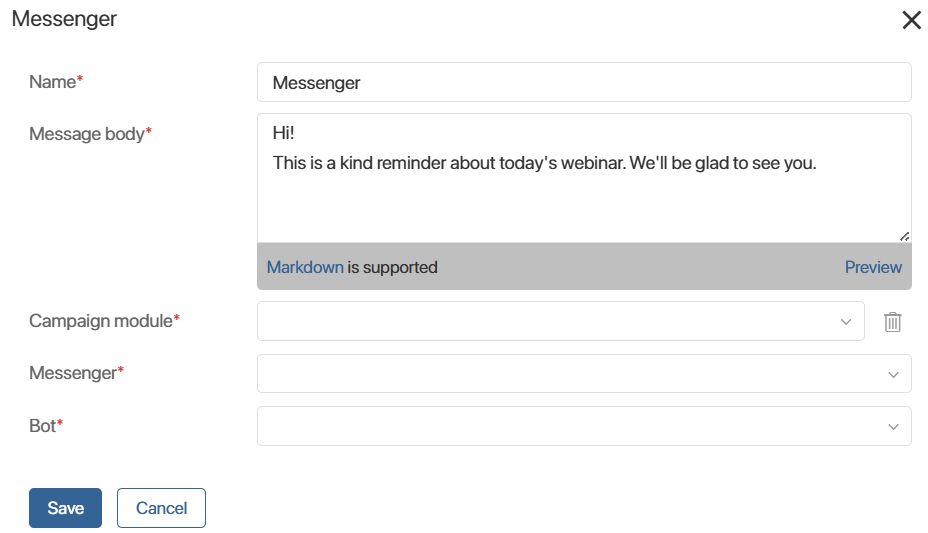
- Name*. Enter the name of the block in the script.
- Message body*. Enter the message text for the client.
- Campaign module*. Select the messenger service with which the integration is configured.
- Messenger*. Select the messenger for the campaign.
- Bot*. Specify the bot with which you configured the integration in the custom module.
Save the settings.