Starting with version 2026.4, BRIX introduces Design V2, an updated design system that provides a more modern, consistent appearance across UI components.
Design V2 rollout timeline
To give you time to prepare your custom interfaces, Design V2 will be introduced in several stages:
- Starting with version 2026.4 Design V2 is available as an optional setting.
- Starting with version 2026.7 Design V2 becomes the default, but you can still switch back to Design V1.
- Starting with version 2026.11 only Design V2 is available and is applied automatically.
Prepare your interfaces for Design V2
Because Design V2 updates component spacing, sizing, and colors, some custom interfaces may not display as intended. We recommend reviewing and updating your configuration before upgrading to version 2026.11.
To prepare your interfaces:
- Enable Design V2 in a test environment and review your custom interfaces.
- Adapt any components that display incorrectly. We recommend using:
- Style editor, a dedicated tool for customizing widget appearance with CSS;
- Design tokens, dedicated variables that define the system's visual style. Using design tokens helps maintain a consistent look and branding across both system and custom interfaces.
- Enable Design V2 for all users in Administration > Theme.
Preview Design V2
You can preview how your interfaces look with Design V2 by using your browser's developer tools. To do this:
- Open a component, such as an app view form.
- Open your browser's developer tools. For example, in Google Chrome, press F12.
- On the Elements tab, enable the .cls panel that displays element classes.
- Disable the old-theme class. Design V2 will be applied to the page in your browser
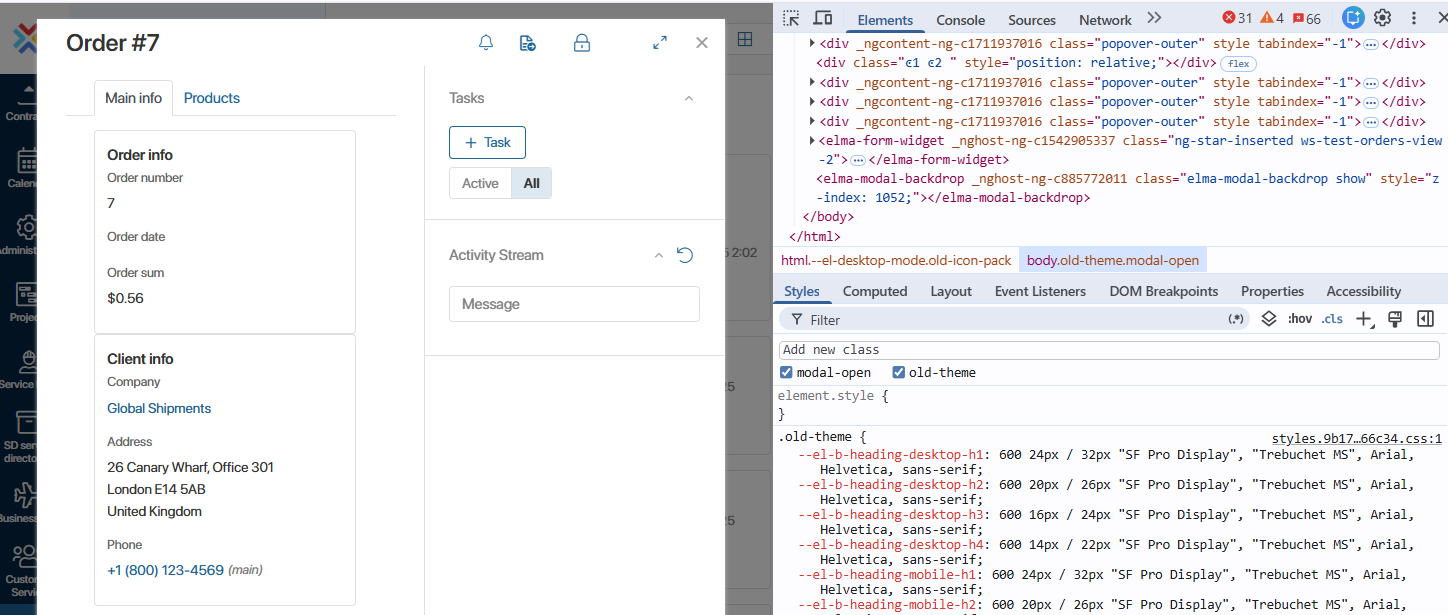
- Review the interface to ensure that component layout, spacing, proportions, and overall visual consistency meet your expectations.
If a custom component does not display correctly, update it to support Design V2.
Update interfaces to support Design V2
To ensure a component displays correctly with Design V2, open it in the interface designer and update the CSS styles of any widgets whose appearance differs from the expected result. We recommend using the style editor and design tokens.
After you have updated and tested your interfaces, enable Design V2 for all users.