In BRIX, you can configure a custom approval route for each individual app item. To do this, the employee fills out a table to:
- Set multiple approval stages.
- Define the approvers for each stage and also the approval type Parallel, Sequential or First Response.
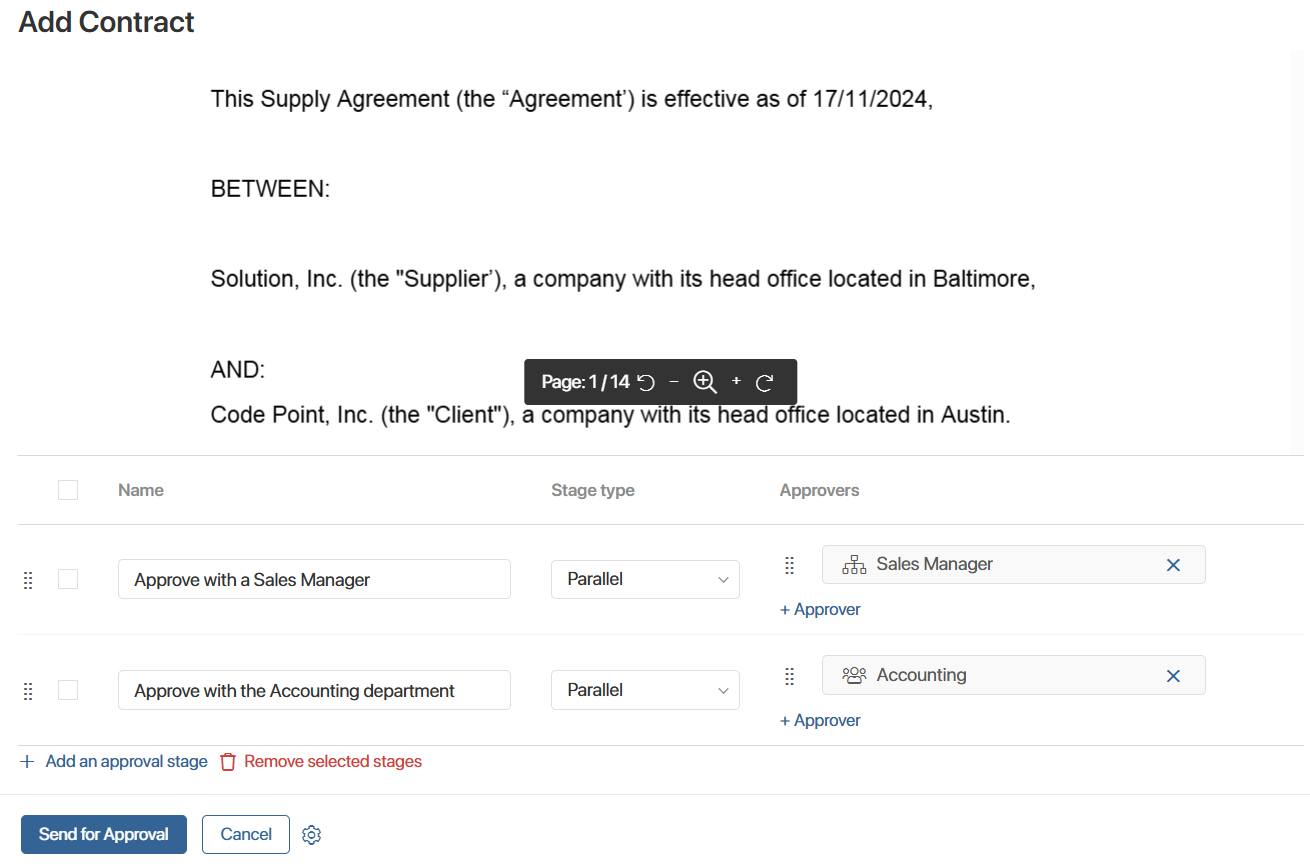
Table-based routes offer flexible configuration to align with your business logic. Users can define approval stages:
- When adding or editing an app item.
- Within a task assigned during a business process.
At each stage of the route, designated approvers automatically receive a task to review the item. The employee who submitted the item can track its real-time approval status directly on its page or receive a task summarizing the approvers' decisions and comments. For more details, see Work with table-based approval routes.
How to set up approval routes
Before employees can build their own approval routes, the system administrator must complete an initial configuration consisting of several steps:
- Determine where users can build approval routes using the Approval Routes widget:
- On the app item create or edit form.
- Within a task assigned during a business process.
- Configure the process to execute the approval route during a workflow using the Approval Route activity. This ensures an approval task is assigned to each designated approver specified in the route settings.
- Choose where users can view the status of each approval stage or the final outcome. Add the View Approval Routes widget to:
- The app item page.
- The form of the task assigned during a business process.
Read more in Initial setup for working with table-based approval routes.