In the general app settings, the system administrator can change the app data, the appearance of app items, create a business process, and more.
To access the app settings, click the gear icon next to the app name and select the desired item from the menu that appears:
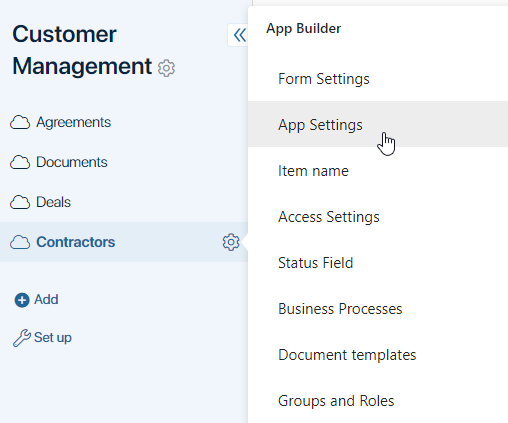
- Form Settings. Customize the appearance of app items.
- App Settings. Change the general app settings: name, description, app icon, etc.
- Item Name. Configure item naming.
- Folder Tree. Enable and configure the folder tree.
- Status Field. Create statuses to track the current state of app items.
- Business Processes. Create a business process associated with an app.
- Groups and Roles. Configure app access.
- Counter. Set up numbering for app items.
- API. View the main API methods for working with the app.