If a locale is installed incorrectly, errors may occur, such as blank workspace interfaces, pages failing to load, and so on. To avoid this, verify the settings. We recommend using incognito mode or a different browser.
Check locale installation and translations
- Make sure that in workspace and module settings:
- The Translations page contains valid .po files with resource translations.
- The source interface language used to create the workspace or module is set.
If you imported a workspace or module from another company, check that the source interface language is specified in its settings. It has to be selected in the source company before export.
- Verify that the new language is available for selection in user profile settings.
- Select the new language in your profile and check the interface translation on the system’s workspace pages.
Localization errors and their causes
- Error: After switching the language in the user profile, the page does not load. The console error message references the language pack.
Common cause: The source language is not set in the workspace settings.
This may be caused by incorrect resource translations in the .po file. To prevent this, translate .po files in dedicated software, such as Poedit. Fix invalid translations in this software as well.
Example of an invalid .po file opened in Poedit:
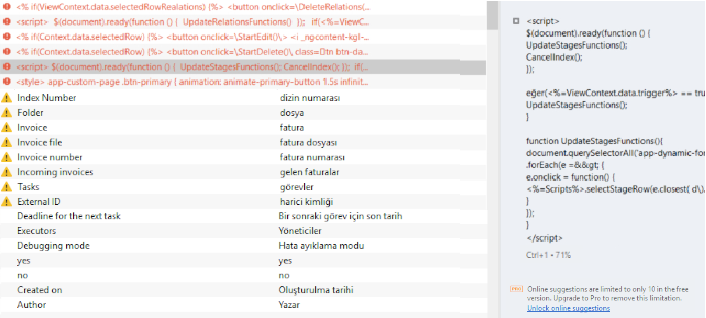
- Syntax error in the .po file.
This may be caused by incorrect use of double quotes. Follow these formatting rules:
- Double quotes can only appear at the beginning and end of each translation line.
Example of incorrect code:
msgid ""
"text1\n"
"text2\n"
msgstr ""translation1\n"translation2\n"
Example of correct code 1:
msgid ""
"text1\n"
"text2\n"
msgstr "translation1\ntranslation2\n"
Example of correct code 2:
msgid ""
"text1\n"
"text2\n"
msgstr ""
"translation1\n"
"translation2\n"
- If double quotes are needed inside a translation, escape them with a \ character, for example:
msgstr "Add the \"Start\" button";
msgstr "Value = \"1\""
Other code formatting guidelines for .po files:
- If the msgstr parameter value is split across two lines, you can write it on a single line. This will not cause an error.
- Do not modify the msgid parameter value (translation key) to correct errors such as typos, extra spaces, case changes, and so on. If such errors exist, the translation key may fail to apply.
- If the source text contains special characters, do not modify them. Translate only the words in the original text.