# Modify BRIX parameters
> [HTML Version](change-settings-enterprise.html)
During the operation of BRIX system, there may be a need to change or reconfigure a particular component of the application. For example, it might be necessary to modify service settings (change email server settings), connection parameters to the application, configure additional functionalities, etc.
The process of modifying application parameters consists of two steps:
1. [Making changes to the configuration file](#changes-config-file).
2. [Applying the new parameters for BRIX](#apply-new-parameters).
## Step 1: Make changes to the configuration file values-brix365.yaml
Changes are made to the existing configuration file \[OBJECT\], which was obtained and filled out during the installation of BRIX.
````
Начало внимание
````
Before making changes to the \[OBJECT\] file, it is recommended to create a backup copy of it. Incorrect changes to the parameters in this file can lead to the BRIX application becoming inoperable.
````
Конец внимание
1. ````
To load the latest file with parameters, run:
````
helm repo update
helm show values brix365/brix365 > values-brix365-new.yaml
````
As a result of executing the command, the \[OBJECT\] file with the parameters of the latest version will be downloaded.
2. To load the file with the parameters of a certain system version, add the \[OBJECT\] flag to the \[OBJECT\] command:
````
helm repo update
helm show values brix365/brix365 --version > values-brix365-new.yaml
````
Where \[OBJECT\] is the system version required.
As a result of executing the command, the \[OBJECT\] file with the parameters of the version specified will be downloaded.
3. To read the file with parameters that was used in BRIX installation, run:
````
helm \[-n namespace\] list
helm \[-n namespace\] get values brix365 > values-brix365-installed.yaml
4. ````
Uncomment and edit the parameters in the \[OBJECT\] configuration file and save the changes.
## Description of parameters found in the configuration file values-brix365.yaml
````
начало примечание
````
**Note**
The following characters are acceptable for passwords:
- Uppercase Latin letters: A to Z.
- Lowercase Latin letters: a to z.
- Numbers: 0 to 9.
- Characters: -\_.
Reserved (unacceptable) characters:
\! \* ' ( ) ; : @ \& = + \$ , / ? % # \[ \] \{ \}
````
конец примечание
### ````
Platform parameters
| | |
|------|------|
| **Name** | **Description** |
| \[OBJECT\] | The domain (FQDN) or IP address through which the system will be accessible.
When installing the system with a specified domain name, it is necessary to add the corresponding AAA record to the DNS server: \[OBJECT\].
Default value: \[OBJECT\]. |
| \[OBJECT\] | The version of the BRIX application to be installed.
Default value: \[OBJECT\].
Available options: \[OBJECT\], \[OBJECT\]. |
| \[OBJECT\] | Enabling host in ingress (value is taken from \[OBJECT\]). If TLS support is enabled, the value is automatically set to \[OBJECT\].
**Important**: If TLS support is not enabled, it's recommended to enable it. It is also planned to use the domain (FQDN) to access the S3 minio storage, installed in the Kubernetes cluster using charts \[OBJECT\].
Default value: \[OBJECT\].
Available options: \[OBJECT\], \[OBJECT\]. |
| \[OBJECT\] | Annotations for ingress.
\[OBJECT\]. |
| \[OBJECT\] | The maximum wait time for sending and receiving a response from the server in seconds for the Ingress controller. |
| `brix365.global.gatewayAPI.enabled` | Enables the use of the [Gateway API](gateway-api.md) (HTTPRoute) to publish BRIX services through an external Gateway.
If enabled, traffic is routed through the Gateway API instead of Ingress.
Default value: `false`.
Available options: `true`, `false`.
|
| `brix365.global.gatewayAPI.parentRefs` | Link to the Gateway through which BRIX will publish.
This parameter must match a previously created Gateway resource in the Kubernetes cluster.
Format:
````
\- name:
namespace:
````
Where:
- `` is the name of the Gateway resource.
- `` is the namespace in which the Gateway was created.
Example:
````
\- name: main-gateway
namespace: istio-system
````
|
| `brix365.global.gatewayAPI.envoyFilter.enabled` | Enables the use of the EnvoyFilter for proper routing through the Gateway API.
Default value: `true`.
Available options: `true`, `false`.
|
| `brix365.global.gatewayAPI.envoyFilter.namespace` | The namespace in which the Gateway is installed, for example, Istio Gateway.
Default value: `istio-system`.
|
| `brix365.global.gatewayAPI.envoyFilter.workloadSelector` | A selector that determines which Gateway components the EnvoyFilter is applied to.
Used to bind settings to the Gateway controller.
Example: `gateway.istio.io/managed: istio.io-gateway-controller`.
|
| \[OBJECT\] | Override the Kubernetes version. |
| \[OBJECT\] | Enable support for HAProxy Ingress to work on the OpenShift platform.
Default value: \[OBJECT\].
Available options: \[OBJECT\], \[OBJECT\]. |
| \[OBJECT\] | Enable check of database connection when installing or updating the BRIX application.
Default value: \[OBJECT\].
Available options: \[OBJECT\], \[OBJECT\]. |
### Proxy server parameters
| | |
|------|------|
| `brix365.global.proxy.enabled` | Enables the use of a proxy server for outgoing application connections.
Default value: `false`.
Available options: `true`, `false`. |
| `brix365.global.proxy.httpsProxyCaps` | HTTPS proxy address in uppercase of the environment variable (HTTPS\_PROXY). Use this for some case-sensitive applications and libraries.
Value format: `https://:@:/`.
Example: `https://proxy\_user:proxy\_pass@host:port/`.
The default value is not set. |
| `brix365.global.proxy.httpProxyCaps` | HTTP proxy address in uppercase of the environment variable (HTTP\_PROXY).
Value format: `http://:@:/`.
Example: `http://proxy\_user:proxy\_pass@host:port/`.
The default value is not set. |
| `brix365.global.proxy.httpsProxy` | HTTPS proxy address in lowercase of the environment variable (https\_proxy). Use this for most Linux applications.
The value format is: `https://:@:/`.
Example: `https://proxy\_user:proxy\_pass@host:port`/.
The default value is not set. |
| `brix365.global.proxy.httpProxy` | The HTTP proxy address in lowercase of the environment variable (http\_proxy).
The value format is: `http://:@:/`.
Example: `http://proxy\_user:proxy\_pass@host:port/`.
The default value is not set.
|
| `brix365.global.proxy.noProxyCaps` | A list of uppercase addresses and subnets (NO\_PROXY) for which the proxy is not used. Separate them with commas:
- Domains: for example, `example.com`.
- Subnet IP addresses in CIDR format: for example, `192.168.0.0/16`.
- Service names: for example, `localhost`.
Example: `localhost,example.com,127.0.0.0/8,cluster.local,linkerd.svc`.
The default value is not set.
|
| `brix365.global.proxy.noProxy` | This is the lowercase equivalent of the `brix365.global.proxy.noProxyCaps` parameter for the environment variable (no\_proxy). Use this for most applications running in a Linux or Unix environment.
The format and example are the same as for the `noProxyCaps` parameter.
The default value is not set.
|
### TLS encryption parameters
| | |
|------|------|
| \[OBJECT\] | Enable TLS support (Enable HTTPS).
Default value: \[OBJECT\].
Available options: \[OBJECT\], \[OBJECT\]. |
| \[OBJECT\] | Name of the secret with certificates for HTTPS operation.
Default value: \[OBJECT\]. |
| \[OBJECT\] | Enabling the root CA certificate for HTTPS operation with a self-signed certificate.
**Important**: before enabling, it's necessary to install the add-on components.
Read more in [Enable network encryption (TLS) in BRIX On-Premises](enable-tls-enterprise.md).
Default value: \[OBJECT\].
Available options: \[OBJECT\], \[OBJECT\]. |
| \[OBJECT\] | Name of the ConfigMap with the root CA certificate for HTTPS operation with a self-signed certificate.
Default value: \[OBJECT\]. |
### Monitoring parameters
| | |
|------|------|
| \[OBJECT\] | Enables monitoring support on the BRIX application side.
Important: Before enabling service monitoring, it's necessary to install add-on components. For more details, refer to the article [Enable monitoring in BRIX On-Premises](enable-monitoring-enterprise.md).
Default value: \[OBJECT\].
Available options: \[OBJECT\], \[OBJECT\]. |
| \[OBJECT\] | Enables the installation of ServiceMonitor in the Kubernetes cluster for BRIX application services.
Default value: \[OBJECT\].
Available options: \[OBJECT\], \[OBJECT\]. |
| \[OBJECT\] | Enables the provision of a significantly larger number of metrics in Prometheus format by the BRIX application services. It's disabled by default to prevent disruption of the entire monitoring system due to an excessive number of metrics.
Default value: \[OBJECT\].
Available options: \[OBJECT\], \[OBJECT\]. |
| \[OBJECT\] | Configures the supplied monitoring tools for the target platform.
Default value: \[OBJECT\].
Available options: \[OBJECT\], \[OBJECT\]. |
| \[OBJECT\] | Enables the installation of Dashboards (ConfigMap) in the Kubernetes cluster for BRIX application services.
Default value: \[OBJECT\].
Available options: \[OBJECT\], \[OBJECT\]. |
| \[OBJECT\] | Enables the installation of PrometheusRule (CRD) in the Kubernetes cluster for BRIX application services.
Default value: \[OBJECT\].
Available options: \[OBJECT\], \[OBJECT\]. |
| \[OBJECT\] | Enables sending traces to the Jaeger agent at the specified address.
Default value: \[OBJECT\]. |
| \[OBJECT\] | Enables sending traces directly to the collector to the specified address. Has a priority over \[OBJECT\].
Default value: \[OBJECT\]. |
| \[OBJECT\] | Enables the [export](export-monitoring-enterprise.md) of \[OBJECT\] metrics, which are recorded in the [performance report](performance-report.md), to the Prometheus storage for their visualization using Grafana.
Default value: \[OBJECT\].
Available options: \[OBJECT\], \[OBJECT\]. |
| `brix365.global.monitoring.externalRmqMetrics` | Enable [RabbitMQ metrics](prometheus-adapter.md) for the HPA (Horizontal Pod Autoscaler).
Available values: `true`, `false`.
|
| `brix365.global.monitoring.rmqExporterVhost` | Specify the virtual host (vhost) from which queued message data is collected for the HPA metrics collection component.
Default value: `brix365`.
|
### Parameters for adding labels and annotations to BRIX services
| | |
|------|------|
| `brix365.global.podLabels` | Labels are Kubernetes internal navigation and grouping tool. For example, you can add monitoring labels to pods to find specific logs.
A label is a key-value pair. Specify them in this parameter in the format: `key: value`.
Use them to define general settings without duplicating them for each service.
|
| `brix365.global.podAnnotations` | Annotations are a Kubernetes tool for storing auxiliary data that helps configure the behavior of external systems or leave notes.
An annotation is a key-value pair. Specify them in this parameter in the format: `key: value`.
Use them to define general settings without duplicating them for each service.
|
| | |
|------|------|
| _Parameters for specifying labels and annotations at the pod level for a specific BRIX service. These parameters are combined with global parameters. In case of conflict, these parameters have a higher priority than the global parameters._ |
| `brix365..podLabels`,
where` `is the name of the service. | A label is a key-value pair. Specify them in this parameter in the format: `key: value`. |
| `brix365..podAnnotations`,
where` `is the name of the service. | An annotation is a key-value pair. Specify them in this parameter in the format: `key: value`. |
### Portable services parameters
| | |
|------|------|
| \[OBJECT\] | Enables support for portable services.
Default value: \[OBJECT\].
Available options: \[OBJECT\], \[OBJECT\]. |
| \[OBJECT\] | Names of the namespace where portable services will be placed.
Default value: \[OBJECT\]. |
| \[OBJECT\] | Specify a data storage system.
Default value: \[OBJECT\]. |
| \[OBJECT\] | Enables the [use of ConfigMap](configmap.md) to configure portable services. This allows you to set resource distribution limits, customize the placement of microservice pods on cluster nodes, etc.
Default value: \[OBJECT\].
Available options: \[OBJECT\], \[OBJECT\]. |
### Service scaling parameters
| | |
|------|------|
| \[OBJECT\] | Enables support for auto-scaling on the BRIX application side. Important: Before enabling service scaling, it is necessary to install add-on components. Read more in the article [Enable service autoscaling in BRIX On-Premises](autoscaling-service-enterprise.md).
Default value: \[OBJECT\].
Available options: \[OBJECT\], \[OBJECT\]. |
| \[OBJECT\] | Choosing the auto-scaling method.
Default value: \[OBJECT\].
Available options: \[OBJECT\], \[OBJECT\].
Where:
- **keda** is Kubernetes Event-driven Autoscaling.
- **hpa** is Horizontal Pod Autoscaler. |
| \[OBJECT\] | Configures the minimum number of replicas.
Default value: **1**. |
| \[OBJECT\] | Configures the maximum number of replicas.
Default value: **9**. |
| `brix365.global.autoscaling.rabbitmqQueueLength` | If you have enabled [RabbitMQ metrics](#rmqmetrics) for the HPA mechanism, set the maximum number of messages in the RabbitMQ queue. Exceeding this number triggers automatic pod scaling.
Default value: `500`.
|
### Connection parameters to the private container image repository
| | |
|------|------|
| \[OBJECT\] | Connection string for private registry.
Format: \[OBJECT\].
Where:
- \[OBJECT\] is the IP or domain name of the private registry.
- \[OBJECT\] is the connection port.
- \[OBJECT\] is the path to the directory.
Default value: \[OBJECT\].
Read more about the required image storage configuration in [Prepare infrastructure](infrastructure-preparation.md). |
| \[OBJECT\] | Name of the secret with access rights to the private registry (must be created manually, encrypted in Base64).
Default value: \[OBJECT\]. |
### Additional parameters in the Global section
| | |
|------|------|
| **Name** | **Description** |
| \[OBJECT\] | Maximum number of connections to the main PostgreSQL node in the pool of unused connections.
Default value: \[OBJECT\]. |
| \[OBJECT\] | Maximum number of open connections to the main PostgreSQL node from the pool.
Default value: \[OBJECT\]. |
| \[OBJECT\] | Maximum lifespan of a connection to the main PostgreSQL node from the pool.
Default value: \[OBJECT\]. |
| \[OBJECT\] | Maximum number of connections to PostgreSQL copies in the pool of unused connections.
Default value: \[OBJECT\]. |
| \[OBJECT\] | Maximum number of open connections to PostgreSQL copies from the pool.
Default value: \[OBJECT\]. |
| \[OBJECT\] | Maximum lifespan of a connection to PostgreSQL copies from the pool.
Default value: \[OBJECT\]. |
| \[OBJECT\] | Maximum response size.
Default value: \[OBJECT\]. |
| \[OBJECT\] | Maximum delay between attempts to establish a GRPC connection.
Default value: \[OBJECT\]. |
| \[OBJECT\] | Number of seconds allocated for the entire Job to execute.
Default value: \[OBJECT\]. |
| \[OBJECT\] | Number of migration attempts during BRIX update.
Default value: \[OBJECT\]. |
| \[OBJECT\] | Maximum waiting time for the **worker** service to finish processing the script. |
| \[OBJECT\] | The default waiting time for script processing to complete. The parameter will be applied if the wait time specified in \[OBJECT\] is exceeded. |
| \[OBJECT\] | Allows you to set a limit on the caching of server script execution schemes in the **worker** service. |
| \[OBJECT\] | Sets the maximum size of the files downloaded into the system. |
### Parameters for database connection, SMTP and other settings
| | |
|------|------|
| __**Platform debugging parameters** |
| \[OBJECT\] | Enables platform debugging mode.
Default value: \[OBJECT\].
Available options: \[OBJECT\], \[OBJECT\]. |
| __**Company parameters** |
| \[OBJECT\] | The email address is specified. The email address will serve as the login for the main administrator.
**Important**: Used when creating a company at the time of BRIX installation, changing \[OBJECT\] makes it impossible to apply new parameters or update BRIX.
Default value: \[OBJECT\]. |
| \[OBJECT\] | Password for the main administrator login.
**Important**: Used when creating a company at the time of BRIX installation.
Default value: \[OBJECT\]. |
| \[OBJECT\] | Company interface language.
Default value: \[OBJECT\].
Available options: \[OBJECT\], \[OBJECT\], \[OBJECT\]. |
| __**Platform language parameters** |
| \[OBJECT\] | Installed platform language.
Default value: \[OBJECT\].
Available options: \[OBJECT\], \[OBJECT\], \[OBJECT\]. |
| __**Database connection parameters** |
| \[OBJECT\] | Connection string to PostgreSQL for write and read operations.
Format: \[OBJECT\].
Where:
- \[OBJECT\] is the name of the PostgreSQL user with rights to the databaseName database
- \[OBJECT\] is the password for the PostgreSQL user.
- \[OBJECT\] is the IP or domain name of the PostgreSQL server.
- \[OBJECT\] is the port for connecting to PostgreSQL, standard port: 5432.
- \[OBJECT\] is the name of the database.
- \[OBJECT\] is the use of a secure connection.
For more details on the necessary PostgreSQL configuration, read the article [Prepare infrastructure](infrastructure-preparation.md). |
| \[OBJECT\] | Enable the use of the external secrets to connect to the database (\[OBJECT\], \[OBJECT\], \[OBJECT\], \[OBJECT\], \[OBJECT\], \[OBJECT\]).
Default value: \[OBJECT\].
Available options: \[OBJECT\], \[OBJECT\]. |
| \[OBJECT\] | Secret name with connection to PostgreSQL for read operations (must be manually created, encrypted in Base64).
It should contain the key \[OBJECT\].
**Important**: enabling \[OBJECT\] disables the \[OBJECT\] parameter. |
| \[OBJECT\] | Connection string to PostgreSQL for read operations.
Format: \[OBJECT\].
Where:
- \[OBJECT\] is the name of the PostgreSQL user with rights to the databaseName database
- \[OBJECT\] is the password for the PostgreSQL user.
- \[OBJECT\] is the IP or domain name of the PostgreSQL server.
- \[OBJECT\] is the port for connecting to PostgreSQL, standard port: 5432.
- \[OBJECT\] is the name of the database.
- \[OBJECT\] is the use of a secure connection.
For more details on the necessary PostgreSQL configuration, read the article [Prepare infrastructure](infrastructure-preparation.md). |
| \[OBJECT\] | Secret name with connection to PostgreSQL for read operations (must be manually created, encrypted in Base64).
It should contain the key \[OBJECT\].
**Important**: enabling \[OBJECT\] disables the \[OBJECT\] parameter. |
| \[OBJECT\] | Connection string to MongoDB.
Format: \[OBJECT\].
Where:
- \[OBJECT\] is the name of the MongoDB user with rights to the databaseName database.
- \[OBJECT\] is the password for the MongoDB user.
- \[OBJECT\] is the IP or domain name of the MongoDB server.
- \[OBJECT\] is the port for connecting to MongoDB, standard port: 27017.
- \[OBJECT\] is the name of the database.
- \[OBJECT\] is the use of a secure connection.
- \[OBJECT\] is the replica set number.
- \[OBJECT\] is the preferred read mode.
For more details on the necessary MongoDB configuration, read the article [Prepare infrastructure](infrastructure-preparation.md). |
| \[OBJECT\] | Secret name with connection to MongoDB (must be manually created, encrypted in Base64).
It should contain the key \[OBJECT\].
**Important**: enabling \[OBJECT\] disables the \[OBJECT\] parameter. |
| \[OBJECT\] | Connection string to MongoDB for the authorization server.
Format: \[OBJECT\].
Where:
- \[OBJECT\] is the name of the MongoDB user with rights to the databaseName database.
- \[OBJECT\] is the password for the MongoDB user.
- \[OBJECT\] is the IP or domain name of the MongoDB server.
- \[OBJECT\] is the port for connecting to MongoDB, standard port: 27017.
- \[OBJECT\] is the name of the database.
- \[OBJECT\] is the use of a secure connection.
- \[OBJECT\] is the replica set number.
- \[OBJECT\] is the preferred read mode.
For more details on the necessary MongoDB configuration, read the article [Prepare infrastructure](infrastructure-preparation.md). |
| \[OBJECT\] | Secret name with connection to MongoDB for the authorization server (must be manually created, encrypted in Base64).
It should contain the key \[OBJECT\].
**Important**: enabling \[OBJECT\] disables the \[OBJECT\] parameter. |
| `global.nosqlUsesPostgres` | Allows you to disable MongoDB during initial system installation. The parameter is available starting with version 2026.2. If enabled, unstructured system settings, @Activity stream, and chat data will be stored in a PostgreSQL database.
Default value: `false`. To disable MongoDB usage, set the parameter to `true`.
**Important**: The option to work without MongoDB is only available to new companies and does not apply to existing ones.
|
| \[OBJECT\] | Valkey connection string.
Format: \[OBJECT\].
Where:
- \[OBJECT\] is the name of the Valkey user with rights to the databaseName database.
- \[OBJECT\] is the password for the Valkey user.
- \[OBJECT\] is the IP or domain name of the Valkey server.
- \[OBJECT\] is the port for connecting to Valkey, standard port: 6379.
- \[OBJECT\] is the name of the database.
For Redis, use the same connection string with the same format.
For more details on the necessary Valkey or Redis configuration, read the article [Prepare infrastructure](infrastructure-preparation.md). |
| \[OBJECT\] | Secret name with connection to Valkey (must be manually created, encrypted in Base64).
It should contain the key \[OBJECT\].
For Redis, use the same key.
**Important**: enabling \[OBJECT\] disables the \[OBJECT\] parameter. |
| \[OBJECT\] | RabbitMQ connection string.
Format: \[OBJECT\].
Where:
- \[OBJECT\] is the name of the RabbitMQ user with rights to vhost.
- \[OBJECT\] is the password for the RabbitMQ user.
- \[OBJECT\] is the IP or domain name of the RabbitMQ server.
- \[OBJECT\] is the port for connecting to RabbitMQ, standard port: 5672.
- \[OBJECT\] is the name of the database.
For more details on the necessary RabbitMQ configuration, read the article [Prepare infrastructure](infrastructure-preparation.md). |
| \[OBJECT\] | Secret name with connection to RabbitMQ (must be manually created, encrypted in Base64).
It should contain the key \[OBJECT\].
**Important**: enabling \[OBJECT\] disables the \[OBJECT\] parameter. |
| **Parameters for connecting to S3 file storage** |
| \[OBJECT\] | S3 file upload method.
Default value: \[OBJECT\]. |
| \[OBJECT\] | S3 server user login. |
| \[OBJECT\] | S3 server user password. |
| \[OBJECT\] | S3 bucket name.
Default value: \[OBJECT\]. |
| \[OBJECT\] | S3 connection string.
Format: \[OBJECT\].
Where:
- \[OBJECT\] is the IP or domain name of the S3 server.
- \[OBJECT\] is the port for connecting to S3, standard S3 port: 9000.
If the port is not specified:
- \[OBJECT\]: select port 80.
- \[OBJECT\]: select port 443. |
| \[OBJECT\] | S3 server location region. |
| \[OBJECT\] | Usage of TLS encryption by the S3 server.
Default value: \[OBJECT\].
Available options: \[OBJECT\], \[OBJECT\]. |
| \[OBJECT\] | Enabling the Virtual-hosted style mode for S3. In this mode, the bucket name is part of the url, for example: \[OBJECT\].
If the parameter is disabled, the address model used is Path‑style.
Default value: \[OBJECT\].
Available options: \[OBJECT\], \[OBJECT\]. |
| \[OBJECT\] | S3 server address for backup by the script \[OBJECT\].
Format:
- For S3 in the Kubernetes cluster: \[OBJECT\]..
- For external S3: \[OBJECT\]. |
| \[OBJECT\] | Secret name with connection to S3 storage (must be manually created, encrypted in Base64).
Should contain keys \[OBJECT\], \[OBJECT\], \[OBJECT\], \[OBJECT\], \[OBJECT\], \[OBJECT\], \[OBJECT\], \[OBJECT\], \[OBJECT\].
**Important**: enabling \[OBJECT\] disables the following parameters:
- \[OBJECT\].
- \[OBJECT\].
- \[OBJECT\].
- \[OBJECT\].
- \[OBJECT\].
- \[OBJECT\].
- \[OBJECT\].
- \[OBJECT\].
- \[OBJECT\].
Default value: \[OBJECT\]. |
| __**SMTP server connection parameters**
_This connection is used to send invitations to new users, letters to recover passwords, and notifications about new tasks_ |
| \[OBJECT\] | IP or URL address for connecting to the SMTP server.
Default value: \[OBJECT\]. |
| \[OBJECT\] | Port for connecting to the SMTP server.
Default value: \[OBJECT\]. |
| \[OBJECT\] | Email address (mailbox name) from which messages will be sent.
Default value: \[OBJECT\]. |
| \[OBJECT\] | SMTP server user login.
Default value: \[OBJECT\]. |
| \[OBJECT\] | SMTP server user password. Use [permitted symbols](#parameters).
Default value: \[OBJECT\].
Disabled if the `brix365.mailer.smtp.mailerSecret` parameter is active. |
| \[OBJECT\] | Use of TLS encryption by the SMTP server.
Default value: \[OBJECT\].
Available options: \[OBJECT\], \[OBJECT\].
Starting with version 2025.10.12, use the` brix365.mailer.smtp.tls` parameter to configure the TLS encryption method for the SMTP server. Leave the `brix365.mailer.smtp.needTLS` parameter set to `false`. |
| \[OBJECT\] | This parameter is available starting with version 2025.10.12. Determines the TLS encryption method used by the SMTP server.
Select one of the following options:
- `notls` for an unsecured connection.
- `tls` for a TLS‑encrypted connection.
- `starttls` for a STARTTLS‑encrypted connection. |
| \[OBJECT\] | The name of the secret with the password for authorization on the SMTP server.
The secret is created manually and is Base64‑encoded. It must contain the `user-password` key.
**Important**: activating `brix365.mailer.smtp.mailerSecret` disables the `brix365.mailer.smtp.password` parameter. |
| __**Parameters for managing two-factor authentication settings when logging in to the system and external portal** |
| \[OBJECT\] | The maximum number of attempts to enter the confirmation code. If the limit is exceeded, the user is asked to enter the code again.
Default value: `3`.
|
| \[OBJECT\] | The length of the digital confirmation code the user receives.
Default value: `4`.
|
| \[OBJECT\] | The code's expiration time in minutes.
Default value: `2m`. |
| **Parameters for configuring recurrent restarts of business process instances** |
| \[OBJECT\] | This parameter determines the interval between restart cycles for active business process instances with problems, such as those with a long-running automated action — script, request to a third-party service, etc.
Default value: `1h`.
|
| \[OBJECT\] | The duration of one cycle in minutes during which active business process instances with problems accumulated in the queue are restarted.
Default value: `10m`.
If all instances have not been restarted, the remaining ones are processed in the next cycle. To prevent instances from piling up in the restart queue, you can increase the cycle duration or decrease the interval between cycles in the previous parameter.
|
| __**Server script execution parameters** |
| \[OBJECT\] | Sets a limit in MB for memory used by one execution fork inside one replica of the worker service.
If the parameter value is not set or is equal to 0, the worker service's operation remains unchanged. |
| __**Parameter for maximum email attachment size** |
| \[OBJECT\] | Sets the [maximum size of attachments](send-email.md#attachments) in outgoing emails. This value must not exceed the limit set in the \[OBJECT\] parameter. Before making changes, ensure your server has sufficient free disk space to store the increased volume of data. |
| __**Parameters of parallel processing of variables/functions** | |
| \[OBJECT\] | Is set after the \[OBJECT\] feature flag is enabled. It sets the number of parallel worker instances inside the variable processing service.
This is useful if a lot of [custom variables](another-template-syntax-functions.md#feature-flag) are used for generating document templates.
Default value is `5`. |
| __**Enabling feature flags** | |
| \[OBJECT\] | To enable a feature flag, enter its name in a new line. In front of the name, add a dash and a space. All the enabled feature flags are provided as a list. |
### Optional environment variables
In the `values-brix365.yaml file`, you can control certain features of the BRIX application, such as the Jaeger service address for sending traces, the expiration date for links to upload objects to S3, and so on.
For this, you can use environment variables which are specified in the following parameters:
- `brix365.global.extraEnv` to apply variable settings to all system services.
- `brix365..extraEnv` to apply variable settings to a specific service. Replace `` with the service name.
If an environment variable is set globally and in a specific service block, the value from `brix365..extraEnv` is used.
Example of configuring the ELMA365\_JAEGER\_ENDPOINT parameter
1. Global parameter:
````
global:
extraEnv:
ELMA365\_JAEGER\_ENDPOINT: "jaeger.monitoring.svc"
2. ````
Worker service parameter:
````
worker:
extraEnv:
ELMA365\_JAEGER\_ENDPOINT: "jaeger.loadtest.svc"
````
If you haven't set a specific value for the `ELMA365\_JAEGER\_ENDPOINT` variable for a service, the global value is used, and tracing is sent to the **monitoring** namespace. The **worker** service has the set `jaeger.loadtest.svc` value, so its tracing is sent to the **loadtest** namespace.
In the table below, you can find a list of available environment variables that are configured in the `extraEnv` parameter.
| | |
|------|------|
| **Name** | **Description** |
| `ELMA365\_JAEGER\_ENDPOINT` | The Jaeger service endpoint to which tracing data is sent. |
| `UPLOAD\_LINK\_DURATION` | The expiration date of technical API links for uploading objects to S3. These are used by microservices to transfer files to storage.
Default value: `120m`.
The value can be specified in minutes or hours.
|
| `DOWNLOAD\_LINK\_DURATION` | The expiration date of technical API links for downloading objects from S3. These are used by microservices to retrieve files from storage.
Default value: `480m`.
The value can be specified in minutes or hours.
Changing the default expiration date for S3 links may be necessary if you work with files through integrations with external services. A new value is set to ensure that file uploads and downloads are completed before the link expires.
|
| `ELMA365\_ASPOSEACTIONS\_FONT\_UPDATE\_ENABLE`
| Enable font uploading and updating. |
| The value is set as follows:
````
global:
extraEnv:
ELMA365\_ASPOSEACTIONS\_FONT\_UPDATE\_ENABLE: "true"
```` |
| ````
`ELMA365\_ASPOSEACTIONS\_FONT\_UPDATE\_PERIOD\_IN\_MINUTES`
| Set the font update frequency. The default value is `30m`. |
| The value is set as follows:
````
global:
extraEnv:
ELMA365\_ASPOSEACTIONS\_FONT\_UPDATE\_PERIOD\_IN\_MINUTES: 30m
```` |
## ````
Step 2: Apply new parameters for BRIX
You can update parameters for BRIX in two ways: online and [offline](#offline-update).
### Update parameters online
1. Determine the chart version with which the BRIX application was installed or updated:
````
helm list \[-n namespace\]
````
Command execution example:
**[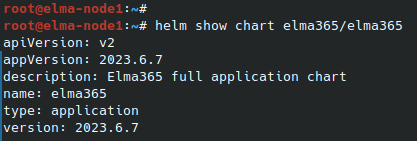]**
After the command execution, you see the chart version information in the \[OBJECT\] string. Save this value for the next step.
2. Update the BRIX parameters using the \[OBJECT\] configuration file. To do this, execute the following command specifying the installed chart version for the \[OBJECT\] flag instead of \[OBJECT\]:
````
helm upgrade --install brix365 brix365/brix365 -f values-brix365.yaml --version --timeout=30m --wait \[-n namespace\]
### ````
Update parameters offline
Navigate to the directory with the chart with which the BRIX application was installed or updated and execute the command:
````
helm upgrade --install brix365 ./brix365 -f values-brix365.yaml --timeout=30m --wait \[-n namespace\]
````
It takes about 10-30 minutes to update the parameters. Wait for it to complete.